Bounty Board
4 min readWhat's new on Bounty Board this September
Easier campaign setup and game submissions, more room to show your work, and player profiles that keep track of your Arcade progress. Here's what's changed.
Written by Sean van den Broek
Marketing Lead, Bounty Board
- product updates
- creator campaigns
- arcade
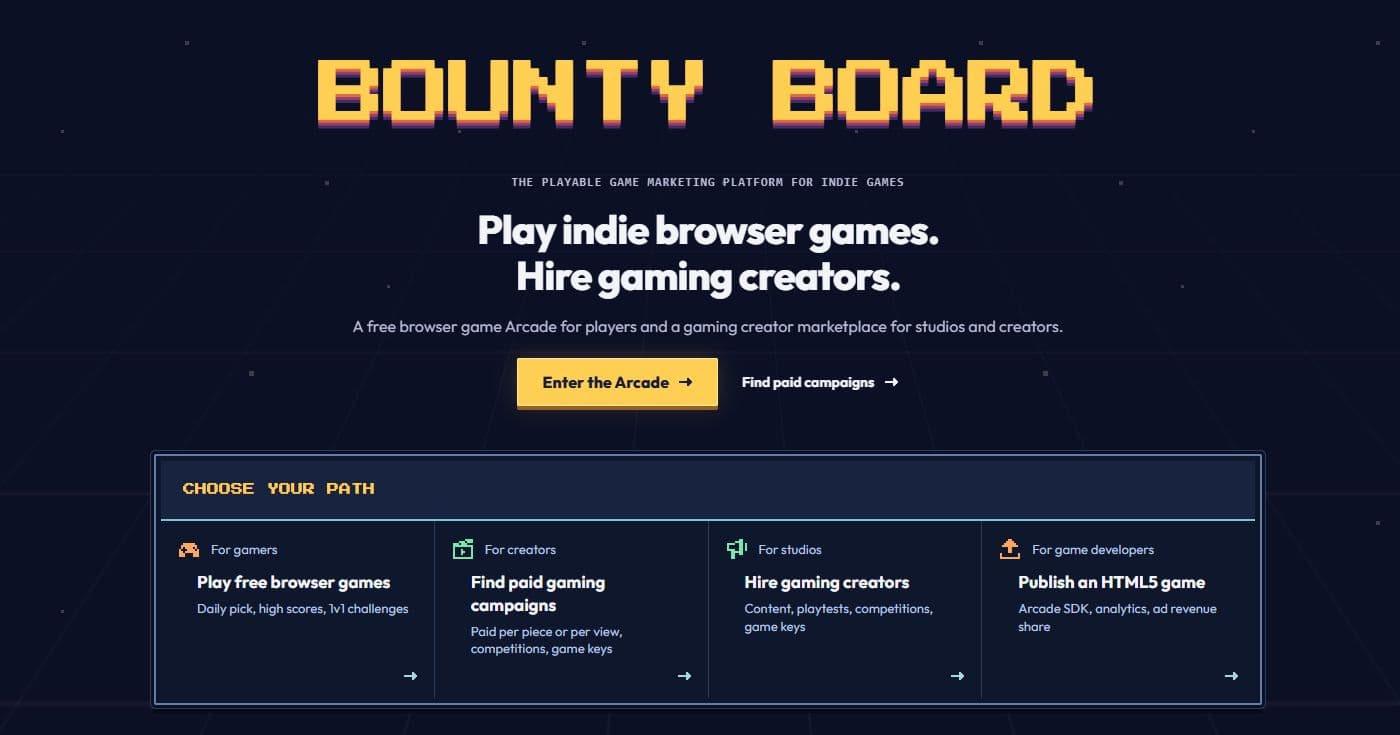
A first look at the new Bounty Board theme we're testing. The design may change before release.
If you've been away from Bounty Board for a few weeks, you'll find a different campaign builder, new ways to show what you've made and played, and fewer setup steps when you submit a browser game. Here's a look at this month's changes.
Start with the game and what you want to make
When you're planning a creator campaign, the useful questions are what you want people to make and how they'll earn. The new campaign builder starts there.
Paste in a game link to bring in its details, then build the campaign around your goal and the rewards you're offering. You can spend that time on the brief instead of entering the same game information again.
We've also brought payment into posting. Cash campaigns are funded when you publish them. If you're posting a package of campaigns, you can pay for the whole package in one checkout, and a saved card makes future campaigns quicker to post.
For studios sharing game keys without a cash reward, there's a $29 listing fee. Coverage is optional: creators can try the game without an obligation to make a video. You can see how campaigns work before choosing what fits your game.
Pick a game, make a video, enter the competition
We've added competitions that rank entries by video views. A competition can bring several games onto one board, giving creators a choice of what fits their channel. Studios can also run one around their own game.
Our September Arcade creator competition shows what that looks like: creators can play Countdown Cavern or MECHA REDLINE, publish on YouTube, and compete for a share of the $400 prize pool. Studios can contribute game-key prizes, too.
You can choose the game that fits your channel and decide how you want to cover it. Prizes go to the qualifying winners under each competition's rules, so check the brief before entering.
Competition cards now show entry counts before you open them. On the Community page, we've also simplified the campaign filters and made it easier to find creators who are live.
A profile for what you make and play
A creator's work says more than a bio can. The new profiles give you a showcase where you can pin favorite clips or upload videos, including work you've made outside Bounty Board.
That helps if you're new here. You can show studios what you make before you've completed your first campaign. Your completed Bounty Board work has its own place on the profile as you build it up.
Players get a card with their level, tier, and earned badges, alongside high scores and a match history of recent activity. You can see your Arcade records and progress in one place, without opening each game's leaderboard.
Studios can feature a game on their profile, and campaign progress now runs from Open through Filling and Closed to Paid. That makes it easier to see where a campaign stands and whether creators have been paid.
Getting your game ready for the Arcade
Once you've got a browser game to share, you can upload your build and try a playable preview before submitting it for review. Automatic setup handles more of the technical details, and upload checks flag issues such as missing game files. For hosted game links, we check for restrictions that could stop the game from running inside the Arcade.
Our reviewers can now request changes on a submission, so you can fix an issue and resubmit while it stays in the review queue. A reviewer still checks the game before it goes live. You can submit your game to the Arcade when you're ready.
Build something with friends
Build rooms are a new place to work on a browser game together using your AI coding agents.
Open a room, connect your agent, and invite friends to take a seat with theirs. You can try the latest build in the room and share a link with people who want to play. When you're ready to publish to the Arcade, the room owner handles that step and the contributors get credit.
Studios using AI coding agents can also connect them to manage campaigns, publish games to the Arcade, and share playtest links.
You can browse the Community page to see what's running, or visit your profile and add a clip you'd want a studio to see.
Keep going
Looking for better-fit indie work?
Browse live campaigns and find games that make sense for your channel.
Related guides
Creator Opportunities
How much can small gaming creators earn from sponsorships?
Sponsorship income is uneven. Here is what changes the rate, what comes out of the payment, and what one Bounty Board creator earned.
- Published
- August 19, 2026
- Read time
- 9 min read
Creator Opportunities
The gaming creator disclosure guide
Cash counts. A free game key counts too. Here is what to disclose, where to put it, and which platform setting to turn on before you publish.
- Published
- August 19, 2026
- Read time
- 11 min read

Creator Opportunities
How gaming creators can find better-fit indie game opportunities
The best creator opportunities are not always the biggest. They are the ones where your audience, format, and taste fit the game.
- Published
- July 11, 2026
- Read time
- 5 min read